

Working with AI
How to get the most out of chatting with Quotient
You can chat with Quotient in plain English, just like you would with a coworker. Tell it what you want, and it will help you get it done. If you've used products like ChatGPT or Claude, the experience will feel familiar.
However, working with AI is different from working with a human in a few key ways. The most important concept to understand is context.
Context and Tools
"Context" refers to the information that is available to Quotient. Unlike humans, Quotient starts each conversation fresh — it doesn't remember what you told it yesterday. It has to be explicitly provided with the information it needs to do its job.
This means you should be explicit about what you want and provide all necessary context in each conversation. Knowing what context Quotient has and doesn't have will help you interact with it more effectively.
When you talk to Quotient, its context will automatically include…
- Information about your brand saved in Quotient's memory
- The conversation history within that chat thread
- An understanding of the Quotient platform itself
- Specialized knowledge relevant to the task at hand (e.g. when writing a blog, Quotient draws on expertise in SEO-optimized content)
However, Quotient's context does not include...
- Knowledge of current events, like today's front page news or what's currently trending in your industry
- Any information about your brand or business that isn't saved in memory
- Your past conversations (if you tell Quotient about a new product feature in one conversation, it won't know about it in future conversations unless you ask Quotient to save it to memory)
To get additional information, Quotient can use tools to look things up. Tools allow Quotient to interact with the outside world, including the Quotient platform, the open internet, and other integrated systems.
Quotient can use tools to find information to add to its existing context, such as…
- Searching the web and visiting web pages
- Looking up a person or company from your Quotient audience
- Looking up all currently active campaigns in Quotient
In addition to looking up information, tools can also perform actions, such as…
- Creating a new campaign
- Editing a blog
- Deleting an email broadcast
@ Mentioning Objects
You can @ mention objects in Quotient, such as Campaigns, Email Broadcasts, Blogs, Segments, and Email Templates.
Mentioning objects will automatically include all of the data about that object into Quotient's context. You can think of this like sharing a URL with a coworker. Your coworker can click into the URL, give it a quick read, and understand what you're talking about. But without the URL, they might be confused and not understand the context.
Here are some examples of when you might @ mention an object:
- If you're asking Quotient to use a specific email template as part of a flow
- If you're asking Quotient to send an email to a specific segment
- If you want Quotient to use a specific asset as the thumbnail image for a blog
Managing Threads
Each conversation in Quotient is called a "thread". Within a given thread, Quotient will recall the entire conversation history, but it won't recall conversations from other threads.
When a thread gets too large or covers too many topics, it tends to confuse or overwhelm the AI. Long threads can be overwhelming for humans too. (No one likes looking at a Slack thread with 150 responses, or an email chain that's 80 replies long.)
To get the best performance out of Quotient, it's best to keep threads scoped to a single task or set of related tasks. A good rule of thumb is to create one thread per deliverable — i.e. a single thread for each blog, campaign, email broadcast, etc.
Sometimes it makes sense to group related deliverables into a single thread. For example, you might be working on a blog post as well as an email broadcast announcing the new post to your subscribers. In this case, it might make sense to create both deliverables in the same thread.
On the other hand, if you have a completely new, unrelated request, it's best to start a fresh thread to begin working on it.
Memories
Although Quotient doesn't naturally remember past conversations the way people do, it can save memories that it draws on in future ones. This is how Quotient learns your business's particular preferences and workflows. If you want Quotient to remember something, just tell it to "please remember this going forward."
Common examples of memories include…
- Which email templates should be used as a starting point when creating new broadcasts
- Which segments or lists should be used in flows and email broadcasts
- Preferences about campaign management (e.g. "campaigns should always contain one email broadcast per blog post")
Memory also holds core information about your brand, like your ideal customer profile and brand voice guidelines. See Memory for what to save and how to organize it.
Choosing an AI Model
Quotient can run on models from several AI providers, including Anthropic's Claude, OpenAI's GPT, Google's Gemini, and xAI's Grok. You can pick one from the model picker in the chat box:
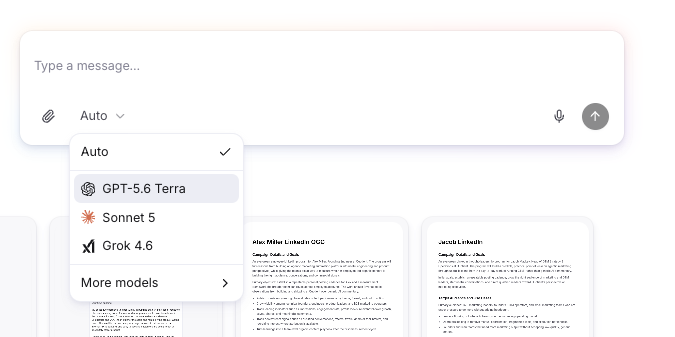
Each message in a thread can use a different model, and the conversation history carries over when you switch.
If you're not sure which to pick, leave it on Auto. We regularly test leading models on everyday marketing work like campaign planning, copywriting, and research, and Auto uses whichever one currently does best.
The picker remembers your choice. An existing thread stays on the last model it used, and a new thread starts with the last model you picked. That default is saved in your browser for each business, so it isn't shared with your teammates.
Models with a Pro badge, like Claude Opus and GPT-5.6 Sol, are premium models. They're available on the Starter plan and above and use more AI credits per message. If your plan changes and you lose access to them, the picker switches back to Auto. See Plans and Billing for how credits work, and check Settings > Usage to track your usage.